Sourced explainer
Supabase pricing in 2026: what the $25 Pro plan really costs
By DipenPublished 5 min read

The short answer
Supabase has a Free plan with 2 projects, a 500 MB database, and 50,000 monthly active users. Pro starts at $25 a month and includes $10 of compute credit, enough for one Micro instance. Every extra project or bigger instance adds compute from $10 a month. Overages are billed for users, egress, storage, and disk. Team starts at $599 a month.
About this piece. This is a sourced explainer. It is based on the sources listed at the end, not on a hands-on product test. How we work
In this piece
- What are Supabase's plans and prices?
- How does Supabase compute pricing work?
- What does Supabase actually cost each month?
- What are the Free plan's real limits?
- What do Pro usage overages cost?
- Which Supabase add-ons add up fast?
- How do you keep a Supabase bill predictable?
- Is Supabase cheaper than the alternatives?
- What we didn't verify
Supabase pricing has two layers, and most surprise bills come from the second one. The plan fee is the part everyone quotes: $0, $25, or $599. Compute is billed separately, per project, by the hour.
Once you see how those two layers fit, the bill is easy to predict. We went through the full Supabase pricing page and the cost-control docs on 8 October 2026 and worked out what real setups cost each month.
What are Supabase's plans and prices?
| Free | Pro | Team | Enterprise | |
|---|---|---|---|---|
| Price | $0 | From $25/month | From $599/month | Custom |
| Monthly active users | 50,000 | 100,000, then $0.00325 each | Same as Pro | Custom |
| Database disk | 500 MB (shared CPU, 500 MB RAM) | 8 GB per project, then $0.125/GB | Same as Pro | Custom |
| Egress | 5 GB | 250 GB, then $0.09/GB | Same as Pro | Custom |
| Cached egress | 5 GB | 250 GB, then $0.03/GB | Same as Pro | Custom |
| File storage | 1 GB | 100 GB, then $0.0213/GB | Same as Pro | Custom |
| Compute credit | n/a | $10/month | $10/month | Custom |
| Backups | None listed | 7 days | 14 days | Custom |
| Log retention | 1 day | 7 days | 28 days | Custom |
Source: Supabase pricing, checked 8 Oct 2026. Team adds SOC 2, ISO 27001, SSO for the dashboard, and an optional HIPAA add-on.
Pro is billed up front each month. Overages land at the end of the billing cycle.
How does Supabase compute pricing work?
Every project runs on its own compute instance, and each instance has an hourly price. Pro and Team include $10 a month in compute credit, which covers exactly one Micro instance.
| Compute size | Memory | Monthly price |
|---|---|---|
| Micro | 1 GB | $10 |
| Small | 2 GB | $15 |
| Medium | 4 GB | $60 |
| Large | 8 GB (2 vCPU) | $110 |
| XL | $210 | |
| 2XL | $410 | |
| 4XL | $960 | |
| 8XL | $1,870 | |
| 12XL | $2,800 | |
| 16XL | $3,730 |
Source: Supabase pricing. Disk includes 3,000 IOPS and 125 MB/s of throughput; extra IOPS cost $0.024 each and extra throughput $0.095 per MB/s.
Supabase's own example: a Pro org with 2 Micro projects pays $25 + $10 + $10, minus the $10 credit, which is $35 a month. The credit applies once per organization. It doesn't multiply with your projects.
This is why "Supabase is $25" gets people in trouble. A staging project, a side project, and production on one Pro org is $45 before any usage.
What does Supabase actually cost each month?
Here are 6 setups priced from the published rates. Overages assume the spend cap is off, since the cap blocks those charges instead.
| Setup | Plan | Compute (net of credit) | Overages | Monthly total |
|---|---|---|---|---|
| Side project on Free | $0 | $0 | $0 | $0 |
| 1 production app, Micro | $25 | $0 | $0 | $25 |
| Production + staging, both Micro | $25 | $10 | $0 | $35 |
| 1 app on Medium compute | $25 | $50 | $0 | $75 |
| 1 Micro app, 150,000 MAU, 400 GB egress | $25 | $0 | $162.50 MAU + $13.50 egress | $201 |
| Team plan, 1 Micro app | $599 | $0 | $0 | $599 |
Our arithmetic from supabase.com/pricing. Taxes not included.
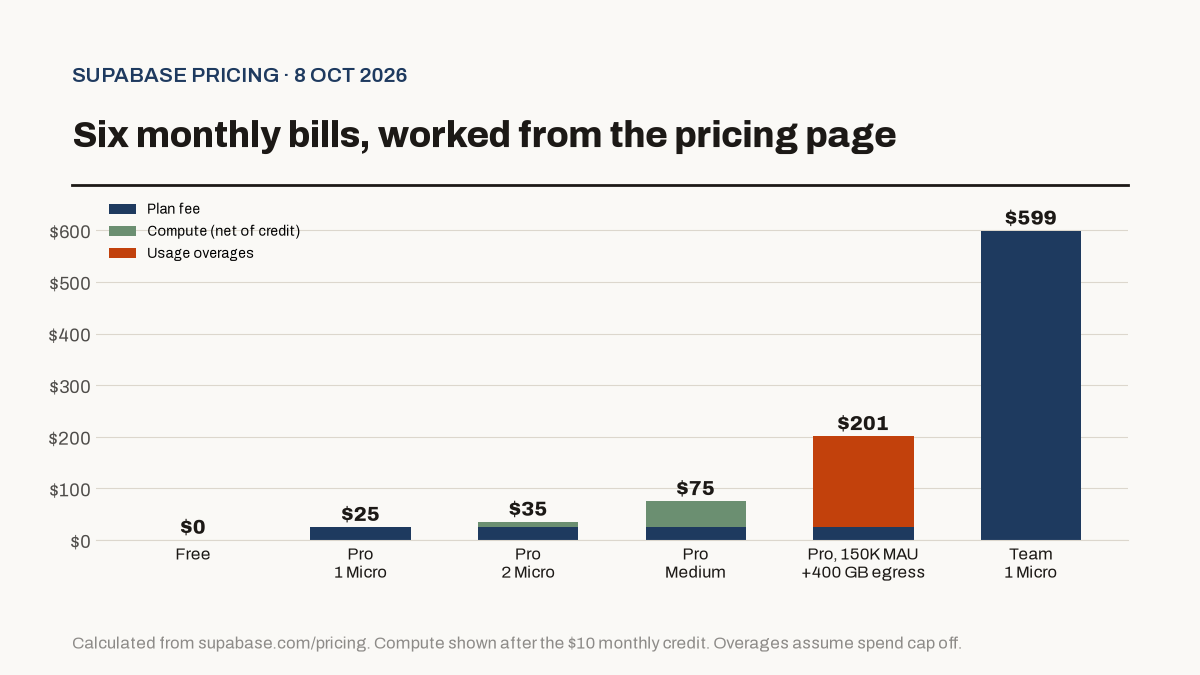
The jump in the fifth row is worth staring at. Going from 100,000 to 150,000 monthly active users costs more than six times the Pro base fee. If you're building a consumer app with lots of light users, model MAU before you model anything else.
What are the Free plan's real limits?
The Free plan is generous for prototypes and strict about idle projects:
- Pauses after 1 week of inactivity. You can restore it, but a paused demo won't load for a visitor.
- 2 active projects per account.
- 500 MB database on shared CPU with 500 MB of RAM.
- 500,000 Edge Function invocations, 200 Realtime peak connections, and 2 million Realtime messages.
- 50 MB max file upload and 1 day of logs.
If anything public depends on it, move to Pro. The pause rule alone makes Free a bad home for production.
What do Pro usage overages cost?
Beyond the table above, Pro meters a few more things:
- Edge Functions: 2 million invocations included, then $2 per million.
- Realtime: 500 peak connections included, then $10 per 1,000. 5 million messages included, then $2.50 per million.
- Image transformations: 100 origin images included, then $5 per 1,000.
- Max upload size: 500 GB per file.
Which Supabase add-ons add up fast?
These are opt-in, and none of them are covered by the spend cap:
| Add-on | Price |
|---|---|
| Point-in-time recovery | $100/month per 7 days of retention |
| Custom domain | $10/month |
| Branching | $0.01344 per branch-hour |
| Advanced MFA (phone) | $75/month, then $10 per extra project |
| SAML SSO for your app's users | 50 MAU included, then $0.015 per MAU |
| Log drains | $60 per drain |
Source: Supabase pricing. A branch running all month (about 730 hours) is roughly $9.81.
How do you keep a Supabase bill predictable?
Start with the spend cap, which is on by default for Pro. Per the cost-control docs, when it's on and you pass a quota, Supabase blocks further use of that item until the next cycle instead of charging you.
It covers disk size, egress, Edge Function invocations, logs, MAU, Realtime, storage, and image transformations. It doesn't cover compute, branching, read replicas, custom domains, extra IOPS or throughput, IPv4, log drains, phone MFA, or point-in-time recovery.
A few more habits that help:
- Count projects. Each project is its own compute line, even inside one org. Pause or delete the ones you don't use.
- Right-size compute. Moving from Micro to Medium costs $50 more a month. Check your database metrics first.
- Cache what you serve. Cached egress is $0.03/GB against $0.09/GB uncached.
- Watch the Upcoming Invoice. The billing page shows a running estimate for the cycle.
Is Supabase cheaper than the alternatives?
For a typical SaaS MVP, Pro at $25 to $35 is hard to beat for a hosted Postgres database with auth, storage, and Realtime included. Our Supabase vs Firebase comparison covers when Firebase's pay-as-you-go Blaze plan works out cheaper.
If you're pricing a whole stack, pair this with Vercel vs Netlify vs Cloudflare Pages for hosting and our Stripe fees breakdown for payments.
Self-hosting is free in license terms. Supabase supports Docker and the CLI, and you take on servers, backups, and upgrades yourself.
What we didn't verify
- Team and Enterprise quotas beyond what the pricing page lists. Large orgs get custom terms.
- Performance at each compute size. We list Supabase's prices and memory, not benchmarks.
- Regional pricing. All figures are USD before tax.
Questions readers ask
Is Supabase free?
Yes, for small projects. The Free plan gives you 2 active projects, a 500 MB database, 50,000 monthly active users, 5 GB of egress, and 1 GB of file storage. Free projects pause after a week of inactivity.
How much is Supabase Pro per month?
Pro starts at $25 a month per organization. It includes $10 of compute credit, which covers one Micro instance. A second Micro project adds $10, so two small projects cost $35 a month.
Why is my Supabase bill higher than $25?
The usual reasons are extra projects (each needs its own compute), a larger compute size, or usage past the Pro quotas, such as more than 100,000 monthly active users or 250 GB of egress. Add-ons like point-in-time recovery ($100 a month for 7 days) also add up.
Does the Supabase spend cap stop all charges?
No. With the spend cap on, Supabase blocks usage past your quota for items like egress, MAU, and storage instead of billing for them. Compute, custom domains, point-in-time recovery, phone MFA, log drains, and some other add-ons aren't covered by the cap.
Can I self-host Supabase for free?
Yes. Supabase is open source and can be self-hosted with Docker or the CLI at no license cost. You pay for your own servers and do your own backups, upgrades, and security.
Sources
Dipen
Founder of Riverra Labs
Founder of Riverra Labs LLP and publisher of MorningStacks.