Sourced explainer
What is llms.txt? The file, the spec, and Google's answer
By DipenPublished 6 min read

The short answer
llms.txt is a Markdown file, usually at a site's root, that gives AI tools a short summary of the site and a curated list of links to its most useful pages. Jeremy Howard proposed it in September 2024 and published v2 in August 2026. Google said in June 2026 that Google Search ignores it, so it won't help or hurt rankings. Coding assistants and AI agents still use it.
About this piece. This is a sourced explainer. It is based on the sources listed at the end, not on a hands-on product test. How we work
In this piece
- What is llms.txt, exactly?
- What goes inside an llms.txt file?
- What does a real llms.txt look like?
- How is llms.txt different from robots.txt and sitemap.xml?
- What changed in llms.txt v2?
- Does llms.txt help with Google rankings or AI Overviews?
- Who does use llms.txt, then?
- How do you create an llms.txt file?
- What mistakes should you avoid?
- Should you bother with llms.txt?
llms.txt is a plain Markdown file that tells AI agents what a website is and which pages are worth reading. Think of it as a reading list for machines, kept at a predictable address.
It has picked up a lot of SEO hype since 2024. Some of that is earned, and some of it Google shot down directly in June 2026. We read the current spec, Google's guidance, and a handful of real files on 8 October 2026, including the one on this site.
What is llms.txt, exactly?
It's a file named llms.txt that lives at a site's root (/llms.txt) or under a path such as /docs/llms.txt. Jeremy Howard proposed it on 3 September 2024 and published a revised v2 on 10 August 2026 at llmstxt.org.
The problem it solves is simple. Web pages are built for people, wrapped in navigation, scripts, and ads. An agent trying to answer a question about your product wastes tokens digging through all that. llms.txt hands it a short, clean summary and links to the pages that matter.
Per the v2 proposal, it's used most heavily for software documentation. A coding agent that needs the right API call reads the library's llms.txt, follows a link, and gets a clean Markdown page.
What goes inside an llms.txt file?
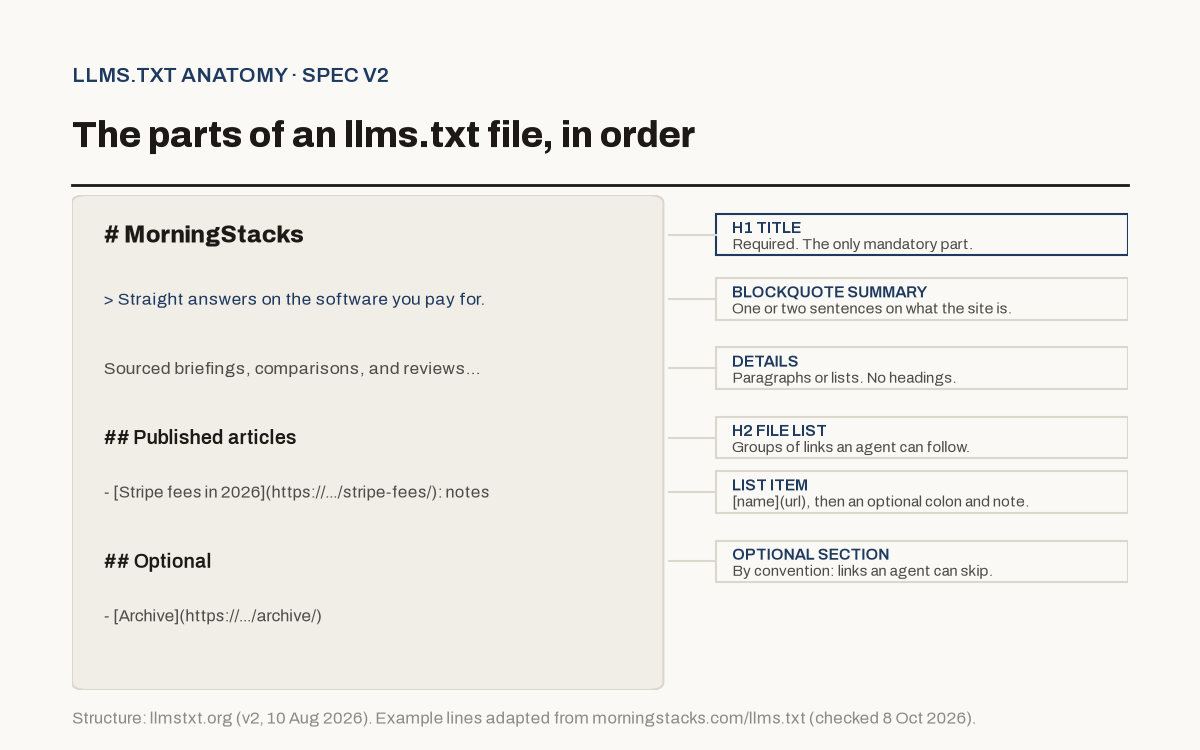
The spec is short. Sections must appear in this order:
- An H1 with the site or project name. This is the only required part.
- A blockquote with a short summary.
- Optional details: paragraphs or lists, but no headings.
- H2 sections with file lists. Each item is a Markdown link,
[name](url), optionally followed by a colon and a note. - An "Optional" H2, by convention, for links an agent can skip when it needs a shorter context.
v2 also proposes two extras. Pages can offer a clean Markdown copy at the same URL with .md added. And sites can point to those copies with rel="alternate" type="text/markdown" and to the llms.txt with rel="describedby", either as HTML link tags or as an HTTP Link: header.
What does a real llms.txt look like?
Here's the top of ours, served at morningstacks.com/llms.txt as plain text:
# MorningStacks

> Straight answers on the software you pay for.

Sourced briefings, comparisons, and reviews of the SaaS, AI, and
developer tools operators and founders pay for. Prices checked.
Affiliate links labeled.

## Site

- Home: https://www.morningstacks.com/
- Archive: https://www.morningstacks.com/archive/

## Published articles

- [How to get a new site indexed in Google Search Console](https://www.morningstacks.com/marketing/get-site-indexed-google-search-console/): Verify the property, submit a sitemap...
One honest note from reading our own file against the spec: the "Site" and "Sections" lists use Name: URL lines instead of [name](url) links. A strict parser would skip those items. The "Published articles" list follows the spec exactly.
Other files we checked, all returning 200 on 8 October 2026:
- Stripe docs serve theirs as
text/markdownand open with install guidance for agents. - Supabase links to a single-file
llms-full.txtwith the whole documentation. - Claude Code docs, Cloudflare developer docs, and Vercel all publish one.
How is llms.txt different from robots.txt and sitemap.xml?
All three sit at the root of a site, which is why people mix them up. They do different jobs:
| File | Who reads it | What it says | Size |
|---|---|---|---|
| robots.txt | Crawlers | What automated tools may and may not access | Short rules |
| sitemap.xml | Search engines | Every indexable URL on the site | As large as the site |
| llms.txt | AI agents, on demand | What the site is and which pages are worth reading | Small enough to fit in an LLM's context |
The spec makes the sitemap point directly. A sitemap often won't list Markdown versions of pages, won't include useful external links, and is usually too big to fit in a model's context. llms.txt is a curated shortlist. It also says nothing about permissions, so it can't replace robots.txt.
What changed in llms.txt v2?
Jeremy Howard's v2 changes page, dated August 2026, lists 4 practical updates:
- Discovery. Pages can point to their Markdown version and to the llms.txt that covers them, using standard link relations in HTML or an HTTP
Link:header. - Two Markdown URL forms. Both
page.html.mdandpage.mdare now allowed. - Subpath files are defined. A file covers the pages under its path, and the most specific file wins. That lets a site that only controls a path, like a GitHub Pages project, take part.
- The "Optional" section lost its special meaning. v1 tooling used it to decide what to drop. In v2 it's just a convention for secondary links.
v2 also states how agents are expected to use the file: read or search it, then follow the links that matter. That's why links should point to clean, LLM-friendly pages.
Does llms.txt help with Google rankings or AI Overviews?
No. Google is unusually direct about this.
Its guide to optimizing for generative AI features says you don't need machine-readable files, AI text files, markup, or Markdown to appear in Google Search, "as Google Search itself doesn't use them." It adds that keeping an llms.txt for other services is fine and "will neither harm nor help your site's visibility or rankings in Google Search, as Google Search ignores them."
Google added that note on 15 June 2026, per its documentation changelog, to address community questions. The same guide lists "creating unnecessary AI text files (like llms.txt)" among the "AEO/GEO hacks" you can ignore for Google Search.
So if an agency is selling you llms.txt as a ranking boost for Google, you now have a link to send them.
Who does use llms.txt, then?
The case for it rests on agents and tools outside Google Search. According to the v2 proposal:
- Thousands of sites publish one.
- Chrome's Lighthouse checks for it as part of its agentic browsing audits.
- OpenAI, Anthropic, and Google's Gemini team publish llms.txt files for their own developer docs.
- Mintlify, GitBook, Yoast SEO, AIOSEO, and Wix can generate one automatically.
Those are claims from the spec's author. We haven't measured how often any specific AI product fetches llms.txt, and we haven't seen an AI vendor publish those numbers.
Where the file clearly earns its keep is developer documentation. If people use coding assistants with your API (see our roundup of AI coding tools for solo founders), a clean llms.txt plus Markdown pages makes your docs easier for those tools to read.
How do you create an llms.txt file?
1. Write the H1 and one-line summary
Use your site or product name as the H1. Put a one or two sentence summary in a blockquote. Say what the site is, plainly.
2. Add the context an agent needs
A short paragraph or list: what you cover, what you don't, and any gotchas. Stripe uses this space to tell agents to check npm for the latest package version.
3. List your most useful pages under H2s
Group by purpose (Docs, Guides, Pricing). Use [Page title](https://full-url): one-line note for every item. Keep it curated. Your sitemap already lists everything.
4. Put secondary links under "Optional"
Changelogs, archives, and long references go here so an agent with a tight context can skip them.
5. Serve it at /llms.txt and test it
Make sure it returns 200 as plain text or Markdown. The spec's own test: give an agent only your llms.txt and ask it questions about your site.
If you're on Next.js, a route handler that builds the file from your content is the easiest way to keep it current. That's how this site does it, so new articles show up without anyone editing the file by hand.
What mistakes should you avoid?
Most bad llms.txt files make one of these errors, each of which runs against the spec:
- Pasting your whole sitemap. The file is meant to be small and curated. Hundreds of links defeat the purpose.
- Linking only to heavy HTML pages. The spec says links should point to LLM-friendly content. If you can serve Markdown versions, link those.
- Skipping the notes. A bare link tells an agent little. A short note after the colon tells it when that page is useful.
- Letting it go stale. A file that lists retired pages or old prices sends agents to wrong answers. Generate it from your content if you can.
- Expecting Google traffic from it. Google has said it ignores the file.
Should you bother with llms.txt?
Yes, if you publish documentation, an API, or a product people ask AI assistants about. It's a small job, it costs nothing, and Google confirms it can't hurt you in Search.
For a typical blog or marketing site, it's a low-priority nice-to-have. Your time is better spent on the basics that do affect Google, like getting indexed in Search Console. And if you're also weighing structured data for AI search, read our piece on what FAQ schema still does in 2026.
Questions readers ask
What is llms.txt used for?
It gives AI agents and coding assistants a short, curated map of a website, written in Markdown, so they can find the right pages without crawling the whole site. It's used most for software documentation.
Does llms.txt help SEO?
Not for Google. Google's AI optimization guide says Google Search doesn't use llms.txt files and that having one will neither harm nor help your visibility or rankings. Other AI services may read it, which is the main reason to keep one.
Where do I put an llms.txt file?
At the root of your site, so it loads at yourdomain.com/llms.txt. The v2 spec also allows a file at a subpath, like /docs/llms.txt, which covers only the pages under that path.
What's the difference between llms.txt and robots.txt?
robots.txt tells crawlers what they're allowed to access. llms.txt tells an AI agent what's worth reading and where to find clean versions of it. One is about permission, the other is a reading list.
Is llms.txt an official standard?
No. It's a community proposal hosted at llmstxt.org with a public GitHub repository. It isn't an IETF or W3C standard, though many documentation platforms generate it automatically.
Sources
Dipen
Founder of Riverra Labs
Founder of Riverra Labs LLP and publisher of MorningStacks.