Sourced comparison
Notion vs Obsidian in 2026: which one should you use?
By DipenPublished 6 min read

The short answer
Pick Obsidian if you want private, local Markdown notes that work offline and cost nothing to use; Sync is $4 a month if you need your notes on several devices. Pick Notion if you work with other people and want shared docs, databases, and projects in one workspace; Plus is $10 per member a month billed yearly. For solo writing and research, Obsidian. For team wikis, Notion.
About this piece. This is a sourced roundup. It is based on the sources listed at the end, not on a hands-on product test. How we work
In this piece
- Notion vs Obsidian at a glance
- How do Notion and Obsidian work differently?
- How much do Notion and Obsidian cost?
- Which is better for personal notes and writing?
- Which is better for teams?
- How do offline access and privacy compare?
- What about AI features?
- Can you switch from Notion to Obsidian?
- Which should you pick?
- What we didn't test
Our pick
Notion vs Obsidian is less of a head-to-head than it looks. They solve different problems, and once you know which problem you have, the choice usually makes itself.
Obsidian is a Markdown editor for files on your own device. Notion is a cloud workspace for docs, databases, and teams. We compared both on 8 October 2026 using their official pricing and help pages.
Notion vs Obsidian at a glance
| Obsidian | Notion | |
|---|---|---|
| Where notes live | Markdown files on your device | Notion's cloud |
| Free plan | Full app, no sign-up | Unlimited blocks for individuals |
| Cheapest paid option | Sync $4/user/mo (annual) | Plus $10/member/mo (annual) |
| Offline | Everything, always | Selected pages (Free), recents and favorites (paid) |
| Collaboration | Shared vaults via Sync | Teamspaces, guests, permissions |
| Databases | Bases (core feature) | Core feature on every plan |
| Publishing to the web | Publish $8/site/mo (annual) | Free notion.site pages; custom domain $8/mo (annual) |
| AI | Community plugins | Notion Agent on Business and up; trial on Free and Plus |
| Extensions | 8,557 community plugins | Connections, API, and Workers |
Plugin count is from Obsidian's public community-plugins list on GitHub, counted 8 Oct 2026. Prices are USD.
How do Notion and Obsidian work differently?
Obsidian opens a folder of plain Markdown files, called a vault, and gives you an editor with links, backlinks, a graph view, and plugins. Your notes stay on your device. Obsidian's pricing page says its apps don't collect telemetry, and that Sync is end-to-end encrypted so Obsidian can't read synced notes either.
Notion is a hosted workspace. Pages, databases, wikis, and project boards live on Notion's servers, and you open them in the browser or the apps. Everything is shared by default within a workspace, which is the point.
That one difference drives most of the trade-offs below.
How much do Notion and Obsidian cost?
Obsidian pricing
| Option | Annual billing | Monthly billing | What you get |
|---|---|---|---|
| Obsidian app | $0 | $0 | Full app on Mac, Windows, Linux, iOS, and Android |
| Sync Standard | $4/user/mo | $5/user/mo | 1 vault, 1 GB, 5 MB max file, 1 month version history |
| Sync Plus | $8/user/mo | $10/user/mo | 10 vaults, 10 GB (up to 100 GB), 200 MB max file, 12 months history |
| Publish | $8/site/mo | $10/site/mo | Publish notes to the web with themes, graph, and search |
| Commercial license | $50/user/yr | n/a | Optional; supports development |
| Catalyst | $25 one-time | n/a | Optional; early betas and badges |
Sources: Obsidian pricing, Obsidian Sync, and Sync plans. Students, faculty, and nonprofit staff get 40% off Sync and Publish.
Obsidian Sync uses AES-256 end-to-end encryption. Because a vault is just a folder of files, you can also skip Sync and keep it in a service you already use, like iCloud Drive, Dropbox, or a Git repo.
Notion pricing
| Plan | Annual billing | Monthly billing | Key limits and features |
|---|---|---|---|
| Free | $0 | $0 | 5 MB uploads, 7-day page history, 10 guests, limited blocks for 2+ members |
| Plus | $10/member/mo | $12/member/mo | Unlimited uploads, 30-day history, unlimited guests, custom sites and forms |
| Business | $20/member/mo | $24/member/mo | Notion Agent, AI Meeting Notes, Enterprise Search, SAML SSO, 90-day history |
| Enterprise | Custom | Custom | SCIM, audit log, unlimited history, zero data retention with AI providers |
Source: Notion pricing. Custom Agents cost $10 per 1,000 Notion credits after a free trial.
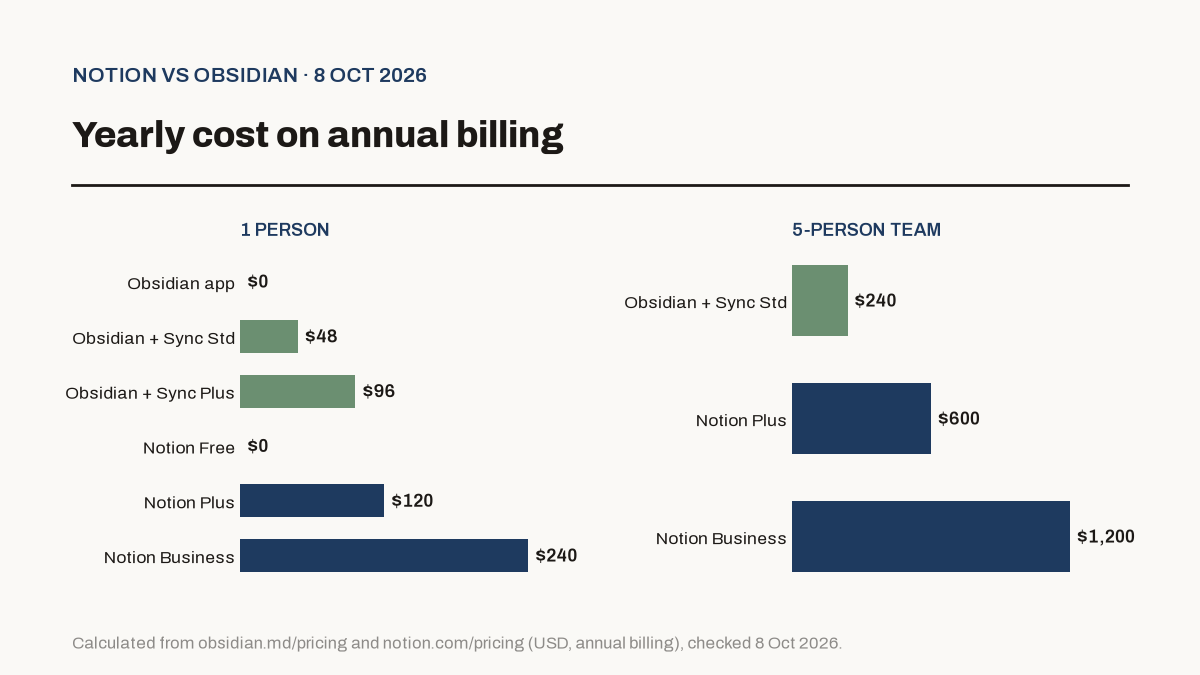
For one person, Obsidian with Sync Standard is $48 a year against $120 for Notion Plus. For a 5-person team, it's $240 for Obsidian Sync against $600 for Notion Plus or $1,200 for Business.
Both free tiers are usable long term. Notion Free is generous for one person; Obsidian free is the full app.
Which is better for personal notes and writing?
Obsidian. For a single person's notes, research, journaling, or drafts, it's the stronger tool:
- Speed and ownership. Notes are local Markdown files. You can open them in any editor, back them up however you like, and keep them if Obsidian ever disappears.
- Linking. Backlinks and the graph view are built for connecting ideas across hundreds or thousands of notes.
- Offline by default. Planes, trains, and bad Wi-Fi don't matter.
- Cost. Free, or $48 a year with Sync Standard.
Notion works fine for personal notes too, especially if you like database views for reading lists or habit trackers. The cost is that your notes live in Notion's cloud and offline access is partial.
Which is better for teams?
Notion, for most teams. It's built for shared work:
- Shared pages with permissions and guests (10 guests on Free, unlimited on paid plans).
- Databases with relations, filters, charts, forms, and automations.
- Web publishing with free notion.site pages, plus SEO controls on paid plans.
- On Business, SAML SSO, private teamspaces, and Notion Agent for AI work across your docs and connected apps.
Obsidian does support teams. Sync can share vaults, and notes update in real time across collaborators. Sync is priced per user, though, and permissions and databases are far lighter than Notion's. It works best for small groups who already like working in Markdown, such as engineers or writers.
If your team also needs an issue tracker, our Linear vs Jira comparison covers that side. Many small teams use Notion for docs and Linear for engineering work.
How do offline access and privacy compare?
Obsidian keeps everything on your device. Its pricing page says the apps don't collect telemetry, it never sells user data, and Sync data is end-to-end encrypted so Obsidian can't read it.
Notion stores your workspace in its cloud. Offline access on Free means choosing specific pages to download. Paid plans automatically download recents and favorites. For Notion AI, Notion's pricing page lists 30-day data retention with its AI model providers on Free, Plus, and Business, and zero data retention on Enterprise.
If you keep sensitive notes, like client details or health records, Obsidian's local-first model is easier to reason about.
What about AI features?
Notion has AI built in. Business and Enterprise include Notion Agent (chat, generate, autofill, translate), AI Meeting Notes, Enterprise Search across connected apps, and a research mode. Free and Plus get a limited trial.
Obsidian has no built-in AI assistant listed on its pricing or Sync pages. Community plugins connect it to AI models, which also means you pick the model and the plugin's privacy terms.
If AI drafting is central to your work, you may get more from a general assistant. Our Perplexity Pro vs ChatGPT for research piece compares two common choices.
Can you switch from Notion to Obsidian?
Yes, and it's officially supported. Obsidian's Importer plugin gives you two routes:
- Connect your Notion account with an API token. This keeps databases and formulas by converting them to Obsidian Bases.
- Import Notion's zip export. No token or internet needed, but databases aren't preserved.
Going the other way is simpler in principle, since Obsidian notes are Markdown files and Notion can import Markdown. We haven't tested either migration on a large workspace.
Which should you pick?
| If you are... | Pick | Why |
|---|---|---|
| A writer, researcher, or student taking personal notes | Obsidian | Local files, fast linking, free |
| A developer keeping docs next to code | Obsidian | Plain Markdown works with Git and your editor |
| A founder running a small team | Notion | Shared docs, databases, and guests in one place |
| A team that needs SSO and admin controls | Notion Business | SAML SSO, private teamspaces, 90-day history |
| Privacy-focused, with sensitive notes | Obsidian | Data stays on your device; Sync is end-to-end encrypted |
| Someone who wants built-in AI on your docs | Notion Business | Notion Agent and Enterprise Search |
Plenty of people use both: Obsidian for their own thinking, Notion for the shared team wiki. If you're also wiring tools together, see Zapier vs Make vs n8n, since Notion's API is a common automation target.
What we didn't test
- Performance at scale. We didn't benchmark large vaults or large workspaces.
- Notion AI quality. We list what Notion's plans include, not how well each feature works.
- Individual plugins. Obsidian's 8,557 community plugins vary widely in quality and upkeep.
Questions readers ask
Is Obsidian really free?
Yes. Obsidian's pricing page says the app is free without limits and needs no sign-up. You only pay for optional services, Sync from $4 a month and Publish from $8 a month per site, both billed annually. Commercial use doesn't require a paid license.
Is Notion free for personal use?
Yes. Notion's Free plan has unlimited pages and blocks for individuals, with 5 MB file uploads, 7 days of page history, and up to 10 guests. Block limits apply once a workspace has 2 or more members.
Does Obsidian work offline?
Yes. Obsidian stores notes as Markdown files on your device, so everything works without an internet connection. Notion has offline support too, but you choose pages to download on Free, and paid plans auto-download recents and favorites.
Can I move my notes from Notion to Obsidian?
Yes. Obsidian's official Importer plugin can connect to your Notion account with an API token and convert databases into Obsidian Bases, or it can import Notion's zip export without databases.
Which is better for teams, Notion or Obsidian?
Notion, for most teams. It's built around shared pages, permissions, guests, and databases. Obsidian supports shared vaults through Sync, but it's built around one person's files first.
Sources
Dipen
Founder of Riverra Labs
Founder of Riverra Labs LLP and publisher of MorningStacks.